
Steam Deck OLED vs Switch 2: Two of Us Argue It Out (2026)
We own both. We don't agree on which one most people should buy. A real back-and-forth ending in a clear buy-by-use-case verdict.
By Jordan Hale and Sam Okafor
Updated: 2026-05-20
Jordan Hale writes our buyer guides. Sam Okafor writes the how-to side. We both own a Steam Deck OLED and a Switch 2, and we disagree about which one most people should actually buy. So we hashed it out.
Jordan: Let me start with the unpopular position. For most people walking in cold, the Switch 2 is the right buy, and it isn’t close. It’s $449.99 at launch. It turns on and plays. The screen is bigger than the Deck’s, 7.9 inches against 7.4, it’s 1080p, it runs at 120Hz in handheld, and it does 4K at 60 on the telly when you dock it. You don’t think about Proton or compatibility layers. You think about whether you want to play Mario.
Sam: And there it is, “whether you want to play Mario.” That’s the entire Switch 2 case in one line, and it’s a good one. I’m not going to pretend otherwise. If you want Nintendo’s games, the Switch 2 is the only legal place to get them. Full stop. But that’s a library argument, not a hardware argument. As a piece of kit to actually live with, the Deck OLED is the nicer thing in your hands, and the OLED screen is most of the reason.
Jordan: The Deck’s screen is smaller, though.
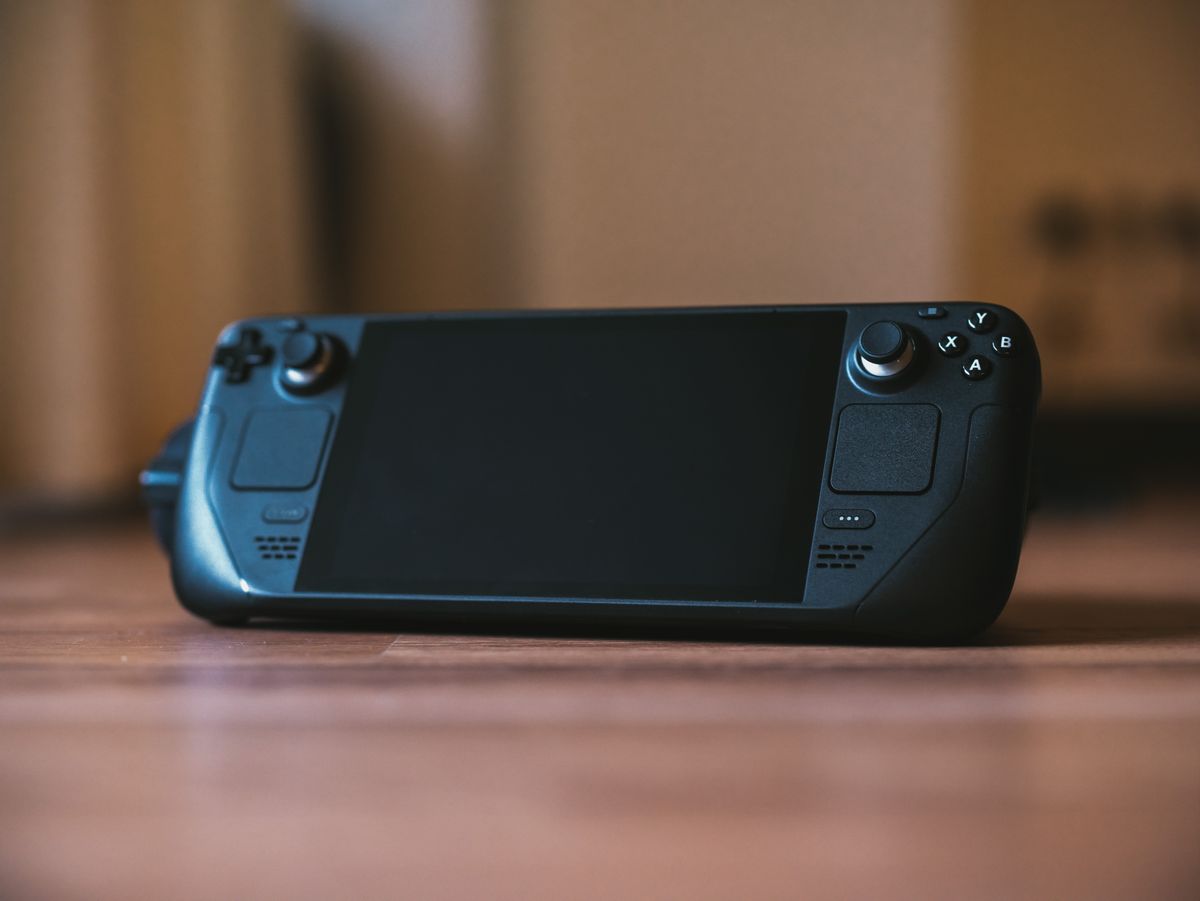
Sam: Smaller and lower resolution, 1280x800, yeah. But it’s OLED. Blacks are actually black. Play something moody, a Hollow Knight or a Hades, and the contrast does something the Switch 2’s LCD just can’t, no matter how many pixels Nintendo throws at it. 90Hz isn’t 120, but I’ll take true blacks over the extra 30 frames every time on a handheld this size.
Jordan: See, I think you’re describing what you value, not what most buyers value. A bright, big, sharp 120Hz LCD reads as “premium” to a normal person in a shop. OLED contrast is a connoisseur thing. And the Switch 2 does the one thing the Deck can’t do well at all, which is dock to a TV and look genuinely good doing it. 4K60 out of a $449 box is a lot of screen for the money.
Sam: I’ll give you the dock. The Deck can output to a TV, but nobody’s buying a Deck to be a living-room console, whereas the Switch 2 is built to be both. That’s a real point. But you keep saying “for the money” like the Switch 2 is the cheap option, and that’s only true if you ignore the library you already own.
Jordan: Go on.
Sam: The Deck OLED is $549 for 512GB, $649 for the terabyte. So yes, $100 to $200 more than the Switch 2. But the second you turn it on, it plays the Steam library you’ve probably been building for a decade. No re-buying. The Switch 2 starts you at zero. Every game is a fresh $50 or $70 purchase at Nintendo’s prices, and Nintendo does not do Steam-style sales. Two or three games in, the price gap has flipped.
Jordan: That’s fair for someone with a big Steam backlog. It’s completely irrelevant to someone who doesn’t have one. That’s the split, isn’t it? You’re assuming a PC gamer. I’m assuming a person who might not own a gaming PC at all.
Sam: That is the split. And I think it’s the honest core of the whole comparison. The Deck is the better buy if you already live on Steam. If you don’t, a lot of its advantages are theoretical.
Jordan: Let’s do the boring stuff people actually ask about. Battery?
Sam: Roughly a wash, and both are mediocre. Nintendo quotes the Switch 2 at about 2 to 6.5 hours depending on the game. The Deck OLED’s 50-watt-hour battery gets you something like 3 to 4 hours on a demanding game, more on something light. Neither gets you across a long-haul flight on its own. You’re carrying a power bank for either.
Jordan: Weight and comfort?
Sam: The Deck’s a brick next to the Switch 2. Bigger, heavier, fills your whole hands. Some people love that, because the grips are genuinely comfortable for long sessions. Some people find it a lot. The Switch 2 is the more portable-feeling of the two, and the Joy-Cons snap on magnetically now, which is a small thing that feels good every time.
Jordan: Here’s one you’ll hate me for. The Switch 2 doesn’t need a manual. The Deck is a Linux PC pretending to be a console, and most days SteamOS hides that well. But the days it doesn’t, you’re reading a forum thread about launch options for one specific game. For someone who just wants to play, that’s a tax. A small one in 2026, much smaller than it used to be, but real.
Sam: I won’t even argue. SteamOS is dramatically smoother than it was two years ago, and “Verified” games really do just launch. But you’re right that the ceiling on tinkering is higher, and for some people the floor is too. The flip side is that the ceiling is the point: emulation, mods, desktop apps, running things Nintendo would never allow. The Deck rewards the person who wants to mess with it. The Switch 2 actively doesn’t want you to.
Jordan: One practical warning for anyone buying right now. Steam Deck stock has been tight through early 2026. There’s a global memory shortage hitting supply, and the OLED has been in and out of availability in a few regions. The Switch 2 you can generally just buy. If you’ve decided on a Deck, don’t assume it’ll be on the shelf the day you want it.
Sam: Good flag. So where does that leave us. Because I don’t think we actually disagree on the facts. We disagree on who the default buyer is.
Jordan: Right. So let’s not fake a consensus. Here’s mine, plainly: buy the Switch 2 if you want Nintendo’s games, if you don’t already own a Steam library, if you want a thing that works without thought, or if docking to the TV matters to you. That’s a big chunk of normal people, and they’ll be happy.
Sam: And mine: buy the Steam Deck OLED if you already own games on Steam, if you care about the screen, or if you want a portable that’s really a PC, with emulation, mods and the back catalogue, all of it. You’re paying a bit more up front and you’re accepting the occasional fiddle. For the right person that trade is obvious.
Jordan: Which leaves the answer neither of us wanted to admit at the start.
Sam: That a lot of people who can swing it end up with both. And not as a cop-out, because they genuinely do different jobs. The Switch 2 is where you play the games you can’t get anywhere else. The Deck is where your existing library lives and travels. I use mine exactly that way. They’re not really competitors in my bag. They’re a Nintendo machine and a PC machine.
Jordan: I’d still tell someone to start with one. Pick based on which library you care about more today. Add the second when a specific game forces your hand, and something always does.
Sam: On that, finally, we agree.
If you do land on one, the accessory that actually changes the experience on either device is storage, because both fill up fast and a decent microSD is cheap insurance [AFF: Amazon | tag TBD | microSD card]. A protective case is the other one worth having before the thing leaves the house [AFF: Amazon | tag TBD | handheld carry case]. Controllers and travel kit we cover separately, where the choice matters more.